Site Patrol: a deep dive
 Paul O'Brien · 8 min read
Site Patrol has turned up in my posts a lot over the last couple of weeks, usually squeezed in between everything else. It went from an idea for a little Mac app to a full monitoring service with apps on four Apple devices, so it deserves a proper write up of its own. Here it is: what it is, why it exists, how it works under the bonnet, who I think it's for and how it compares with UptimeRobot.
Contents
- Why I built it
- How it works
- A tour of Site Patrol
- The apps
- Who it's for
- Site Patrol vs UptimeRobot
- Site Patrol or Site Watch?
- What it isn't
- Getting started
Why I built it
Most people find out their website is down when a customer tells them. I wanted to be the first to know, not the last, and I wanted the same for anyone running a website, a shop or a handful of client sites.
Website monitoring also has a habit of looking like a cockpit: dozens of settings, charts nobody reads and alerts that cry wolf. I wanted the opposite. Add your address, turn on alerts and get on with your day. When something breaks, Site Patrol tells you what, when and why in plain English, and when it's fixed it tells you that too.
What started as an idea for a little Mac app quickly grew into something much bigger, and I bought the domain the same afternoon (as you do). The website came first, then the apps, because an alert is only any good if it reaches you wherever you are.
How it works
Site Patrol runs on Cloudflare, and every check is made from Cloudflare's worldwide network:
- Checks every minute on Pro and every 5 minutes on Free. On Business, 10 of your monitors can be checked every 30 seconds.
- Two failed checks in a row before anything counts as down, so a single blip never wakes you at 3am.
- Confirmed from another region, with checks from west Europe, east US and Asia Pacific, so a problem on one network doesn't send you running.
- More than "is it up?" A website can answer and still be broken, so it also looks at how long it takes, the words on the page, the security certificate and the domain renewal date.
- One alert when it goes down and one when it's back, with how long it was down. If something keeps going up and down, one alert says so and then it goes quiet.
It isn't only websites. Site Patrol can watch APIs, DNS records, mail servers (sending and reading) and any other server and port, such as a database or SSH. Scheduled jobs like a nightly backup can check in with us too, and if one stops running, you'll know.
A tour of Site Patrol
Here are the parts I use most, all shown with the example business I use for testing.
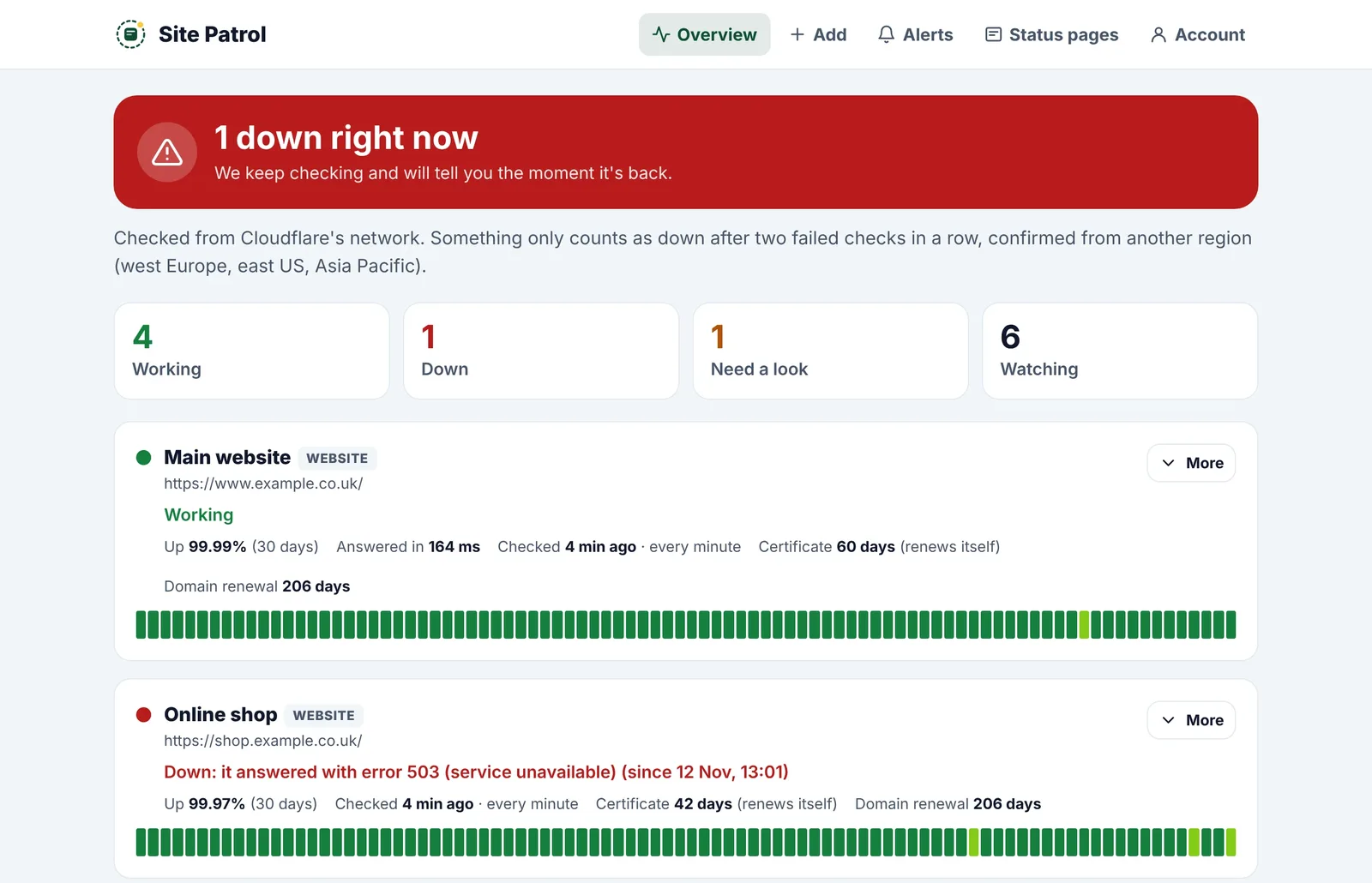
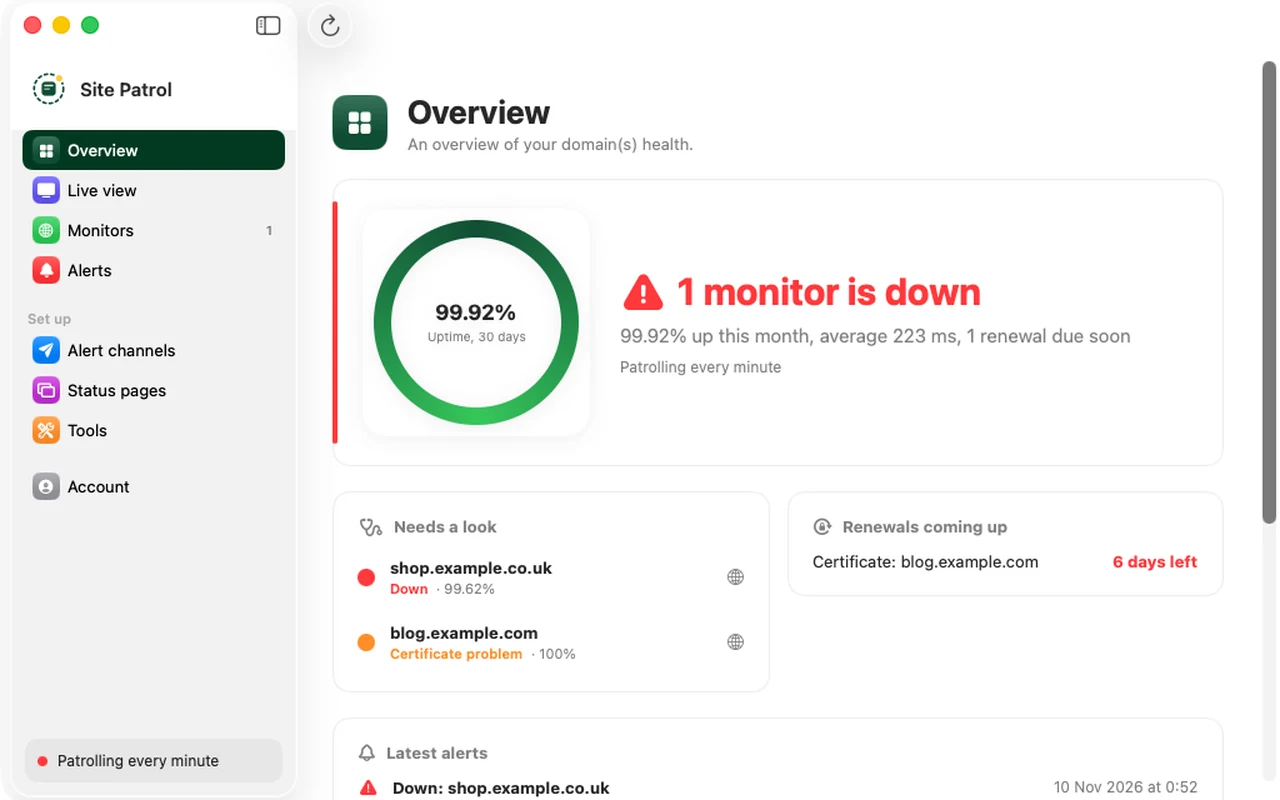
The overview. Everything you watch on one page. Something down goes to the top in red, with why and since when, and each monitor shows its uptime, response time, certificate and domain renewal at a glance.
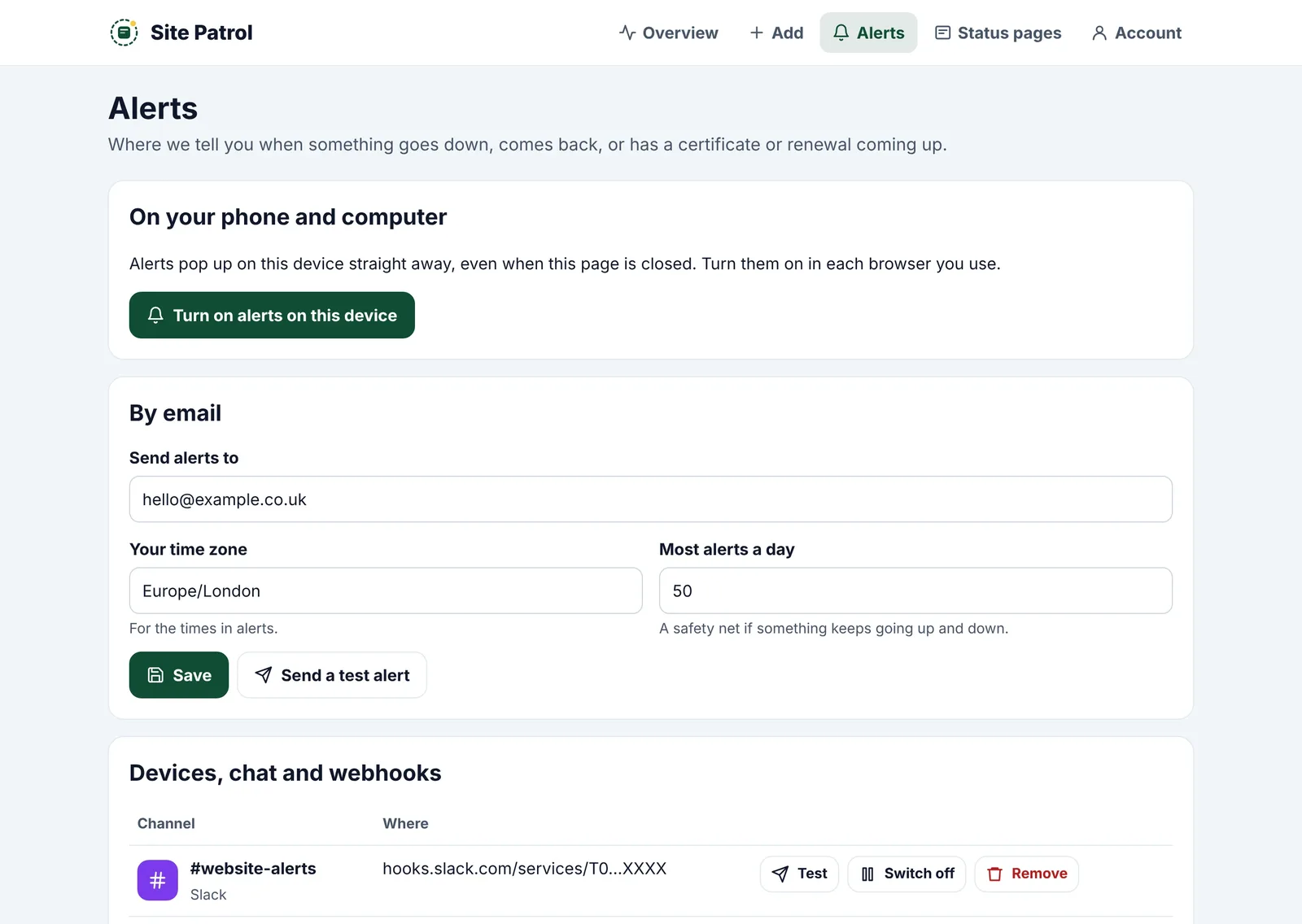
Alerts. Choose where alerts go: your phone, your computer, email, Slack, Microsoft Teams, Google Chat, Discord or your own webhook, and send a test to each. Pro and Business add text messages, which come from "SitePatrol" rather than a random number. You also choose the most alerts you want in a day, as a safety net if something keeps going up and down.
Emails that say what broke. Every email says what broke and when, in plain words, with one button to see more. Back up emails come in green.
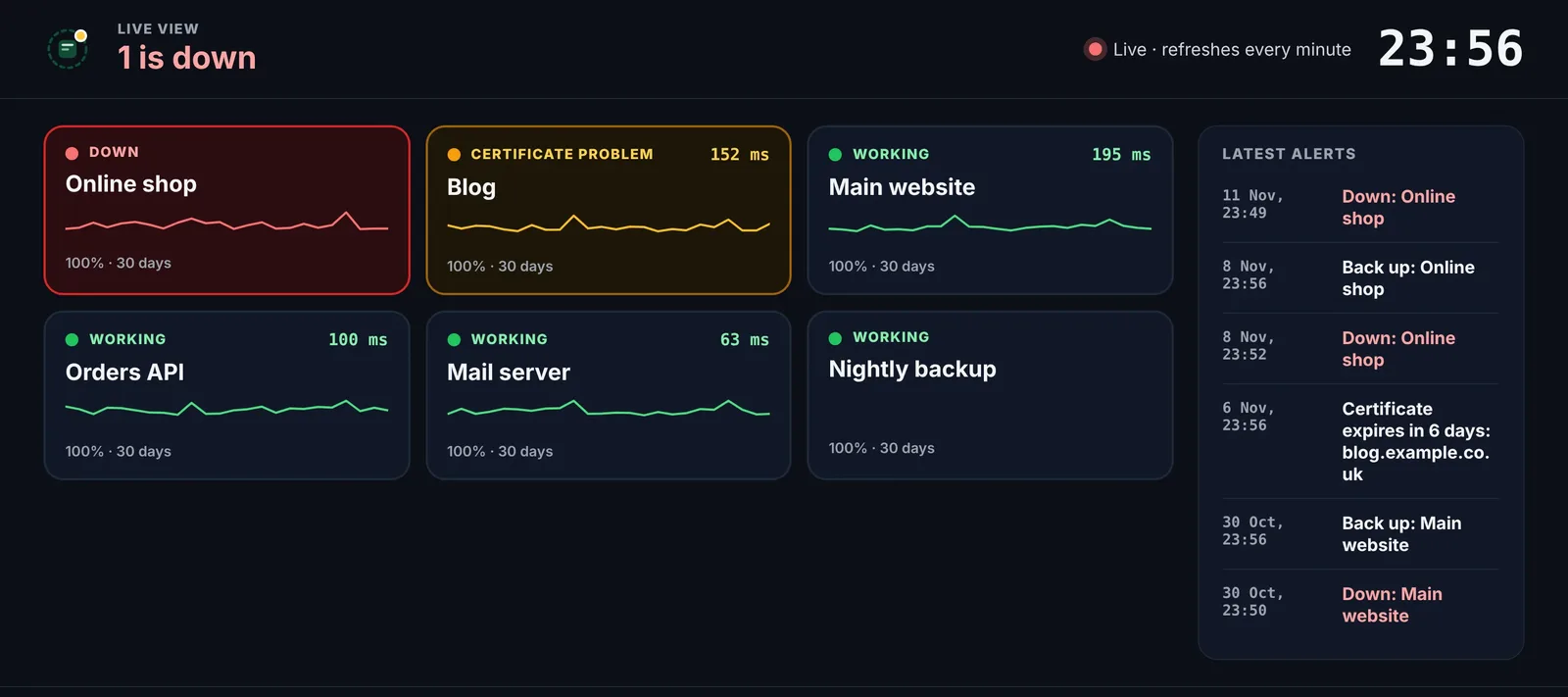
Live view. Every check on one dark screen, ticking by as it happens. Put it on a spare monitor or the office TV and it keeps itself up to date. Live view links run out, so you're not leaving it open for the world.
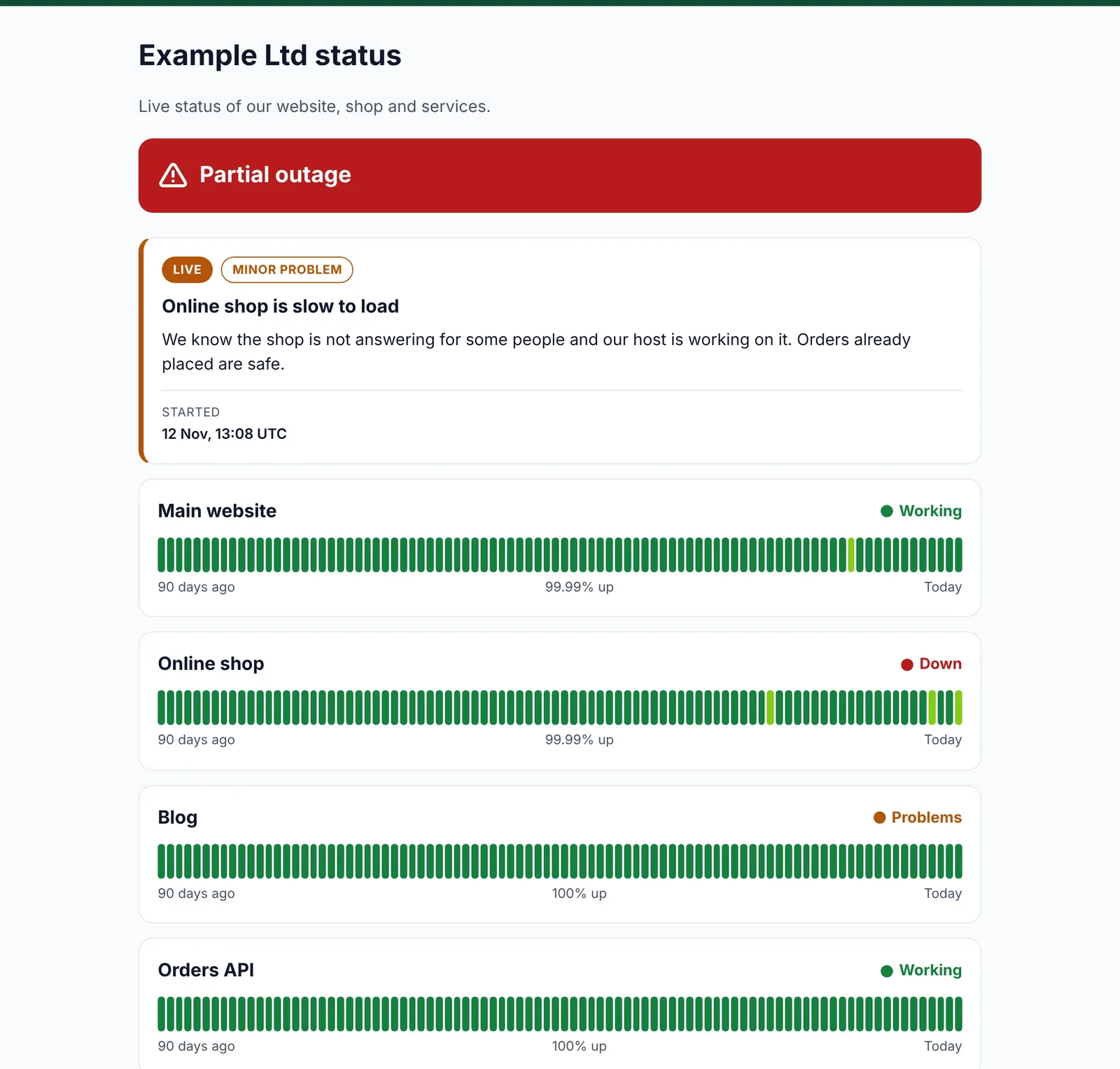
Status pages. A public page your customers can check, with one clear line at the top, 90 days of history for each service and your own notices for a problem or planned work. It lives at yourname.sitepatrol.app or on your own domain, something like status.yoursite.com, with a helper that walks you through the DNS. Visitors can subscribe by email, chat or feed, and on Pro you can add your own logo, colour and contact details. Server addresses are never shown, only the names you choose.
For the tinkerers. There's an API to add, pause and check monitors from your own tools and signed webhooks for your alerts. You can even ask Claude about your websites through a read only connector.
The apps
These are my first ever Apple apps, and it's been a learning curve, but one I've enjoyed and embraced. The apps are free to download, they work with every plan, including the free one, and everything you set up shows up everywhere.
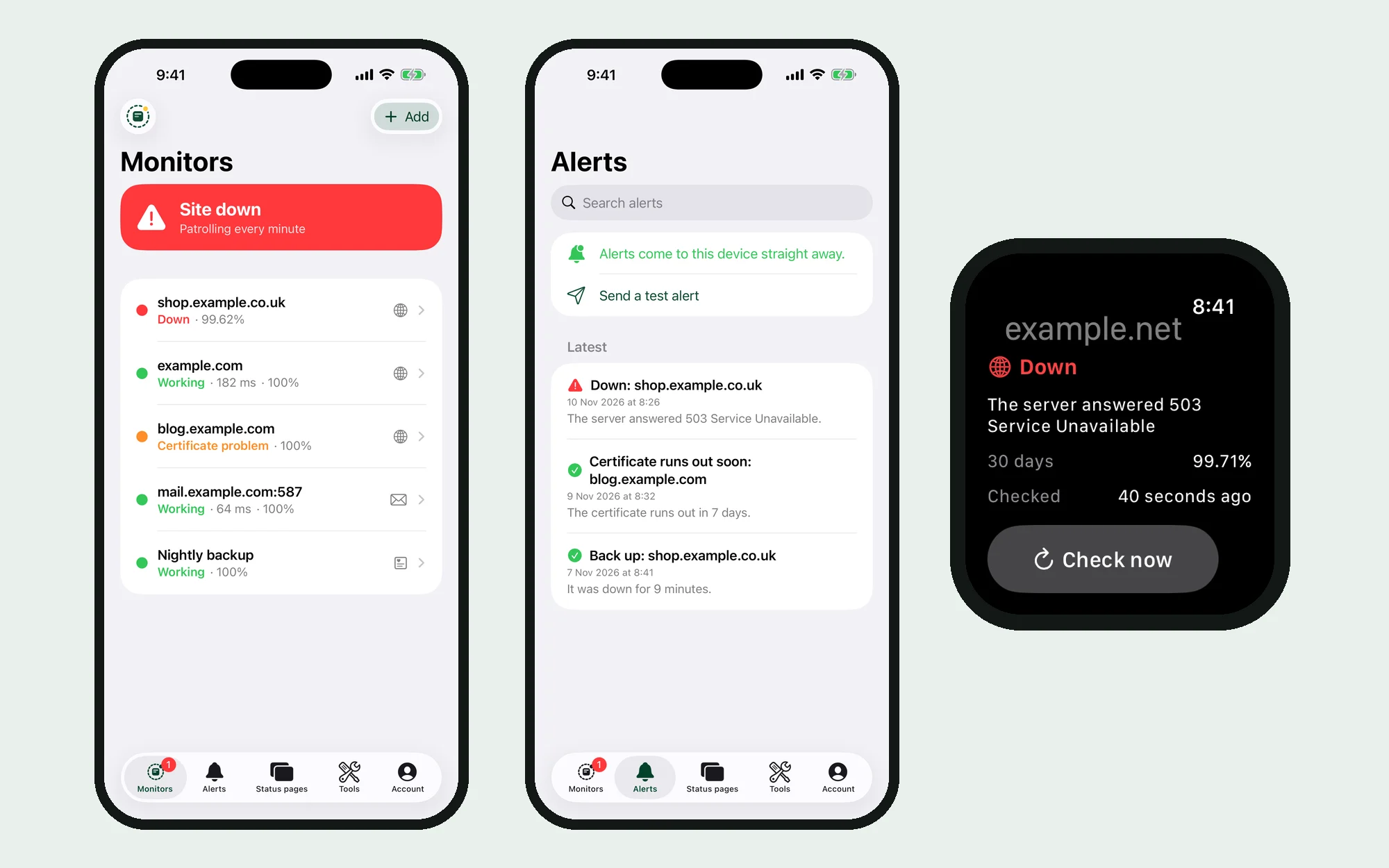
iPhone and iPad. Alerts pop up the moment we're sure a site is down, even with the app closed, and again when it's back. Open one to see what we saw, how fast it answers and when the certificate and domain run out. You can pause alerts while you work on your site, post a notice to your status page and add widgets to your Home Screen. Apple accepted the iPhone app in the first round, so I was super pleased.
Apple Watch. A tap on the wrist when something goes down, and another when it's back, even while your phone is out of sight. To be completely transparent, I don't own one, so I tested it on my wife's watch and it worked a treat.
Mac. The full control panel, with everything you can do on the website: Live view, status page design with your own domain, team logins, uptime reports to download and a mark in the menu bar that turns red when something breaks. It really is a sleek app that simply does what it says on the tin.
Siri and Shortcuts. On iPhone, iPad and Mac you can ask "Are my sites up in Site Patrol", pause and resume alerts, post a notice or check any website, all by voice.
One thing worth knowing: the apps don't sell anything. You'll never be asked to pay inside them, and upgrades happen on the website. Android and Windows apps are coming soon, and until then Site Patrol works in any browser, with alerts straight to your phone or computer.
Who it's for
Small businesses. Shop, café and salon owners who don't want to learn a monitoring tool. Plain English alerts, and a status page that answers customers before they ask, which saves a pile of emails.
Online shops and WordPress sites. Every minute your checkout is down costs you sales. Watching for words on the page means a white screen or a "Database error" counts as down, even when the page still loads.
Agencies and freelancers. Every client website checked every minute, alerts in a shared Slack, Teams, Google Chat or Discord channel and domain and certificate reminders for every client, 30, 7 and 1 days ahead. Nothing dents trust like a client spotting the problem before you do. If you look after lots of client websites, there's an agency option where each client gets their own account, fully white label, and you set the pricing.
Developers. APIs with your own method, headers, body and JSON checks, scheduled jobs that check in, signed webhooks and an API to plug it into your own tools.
Site Patrol vs UptimeRobot
UptimeRobot is popular and its free plan is generous. Site Patrol is for people who'd rather pay a little for checks every minute with every alert included, and who want proper apps on their Apple devices.
| UptimeRobot | Site Patrol | |
|---|---|---|
| Free plan | 50 monitors, checked every 5 minutes | 1 website, checked every 5 minutes |
| Checks on the first paid plan | Every 60 seconds | Every minute, and every 30 seconds on Business |
| Team chat and webhooks | 5 integrations on Free; webhooks from the Team plan | Slack, Teams, Google Chat, Discord and webhooks, all on Pro |
| Text alerts | Credits from Solo | Included on Pro and Business, UK numbers for now |
| Status page | Basic on Free; your own domain from Solo | On Pro, on your own domain |
| Apps | Android and iPhone | iPhone, iPad, Mac and Apple Watch, with Android and Windows coming soon |
UptimeRobot details are from their own website when we built the UptimeRobot comparison, and they may have changed since.
To be fair, UptimeRobot may suit you better if you need a much bigger free plan, checks down to every 15 seconds, more kinds of check such as UDP, or voice call alerts. There are also comparisons for Pingdom and StatusCake on the site.
Site Patrol or Site Watch?
If you've been around this site for a while, you'll know Site Patrol is built on Site Watch, my monitoring app that you can install free on your own Cloudflare account. So which one should you pick?
- Site Watch is for people who like running things themselves. It's free for up to 10 websites, runs on your own Cloudflare account and you look after it.
- Site Patrol is the hosted service I run for you. Nothing to install, checks from three regions, text alerts and the apps for iPhone, iPad, Mac and Apple Watch.
What it isn't
To be fair about it, Site Patrol isn't for everyone.
- The free plan is for one website. If you want to watch lots of sites for nothing, UptimeRobot's free plan or Site Watch on your own Cloudflare account will suit you better.
- Text alerts go to UK numbers for now, with US numbers coming soon, and there are no voice call alerts.
- The apps are on Apple devices today. Android and Windows apps are coming, and in the meantime the website does everything in any browser.
- There's no import from other monitoring services yet. Adding a website takes a few seconds, and developers can add lots at once with the API.
Getting started
Everything you need is on sitepatrol.app. There's a free forever plan for one website, no card needed, and you can see it working in about a minute. Every plan, limit and feature is laid out on the pricing page. The apps are on the App Store for iPhone, iPad, Mac and Apple Watch, and if you look after lots of client websites, email us and a real person will reply.
As always, sharing the love.