DNS checker: a deep dive
 Paul O'Brien · 3 min read
Over the next nine days I'm taking a proper look at each of the tools on this site, one a day. First up is the DNS checker. Type in a domain and it tells you, in plain English, whether that domain's email is set up properly, and if it isn't, it gives you the exact record to copy and paste.
Contents
Why I built it
The question I get asked most about email is some version of "why are my emails going to junk?" Nine times out of ten the answer is in the domain's DNS: an SPF record that's missing a sender, DKIM that was never switched on or a DMARC record that's only watching.
There are plenty of DNS lookup tools out there, but most of them show you the raw records and leave you to work out what they mean. I wanted one that reads the records the way a receiving mail server does, explains what's wrong in words anyone can follow and hands you the fix.
How it works
The DNS checker runs on Cloudflare Workers and looks up records with DNS over HTTPS, so a check takes a few seconds.
- Only public records. It reads what anyone can look up. You never sign in to your domain or your email.
- Read like a mail server. SPF, DKIM and DMARC are checked the way Gmail, Yahoo and Microsoft check them, including how they line up with each other.
- It knows your providers. It works out who runs your DNS and your email, so the fix steps talk about Cloudflare, Fastmail, Google Workspace or whoever you use.
- Reports don't hang around. They're deleted after 7 days.
What it checks
| Area | What it looks at |
|---|---|
| Who can send as you | SPF, DKIM and DMARC, and whether they line up |
| Where your mail goes | MX records, the provider behind them, reverse DNS and MTA-STS |
| Your brand | BIMI |
| Security | DNSSEC, CAA and the nameservers |
| Trouble spots | Ten blocklists and parked domain protection |
| The domain itself | The registrar, the transfer lock and when it expires |
A real report
Here's my own domain, paulobrien.com. When I first checked it a few days ago it scored 9.3 out of 10. Nothing was broken, but my SPF record ended in ?all, which tells receiving servers nothing about mail that fails, and the checker suggested a stricter version with the exact record and where to put it in Cloudflare. I made the change, checked again today and it now scores 10 out of 10.
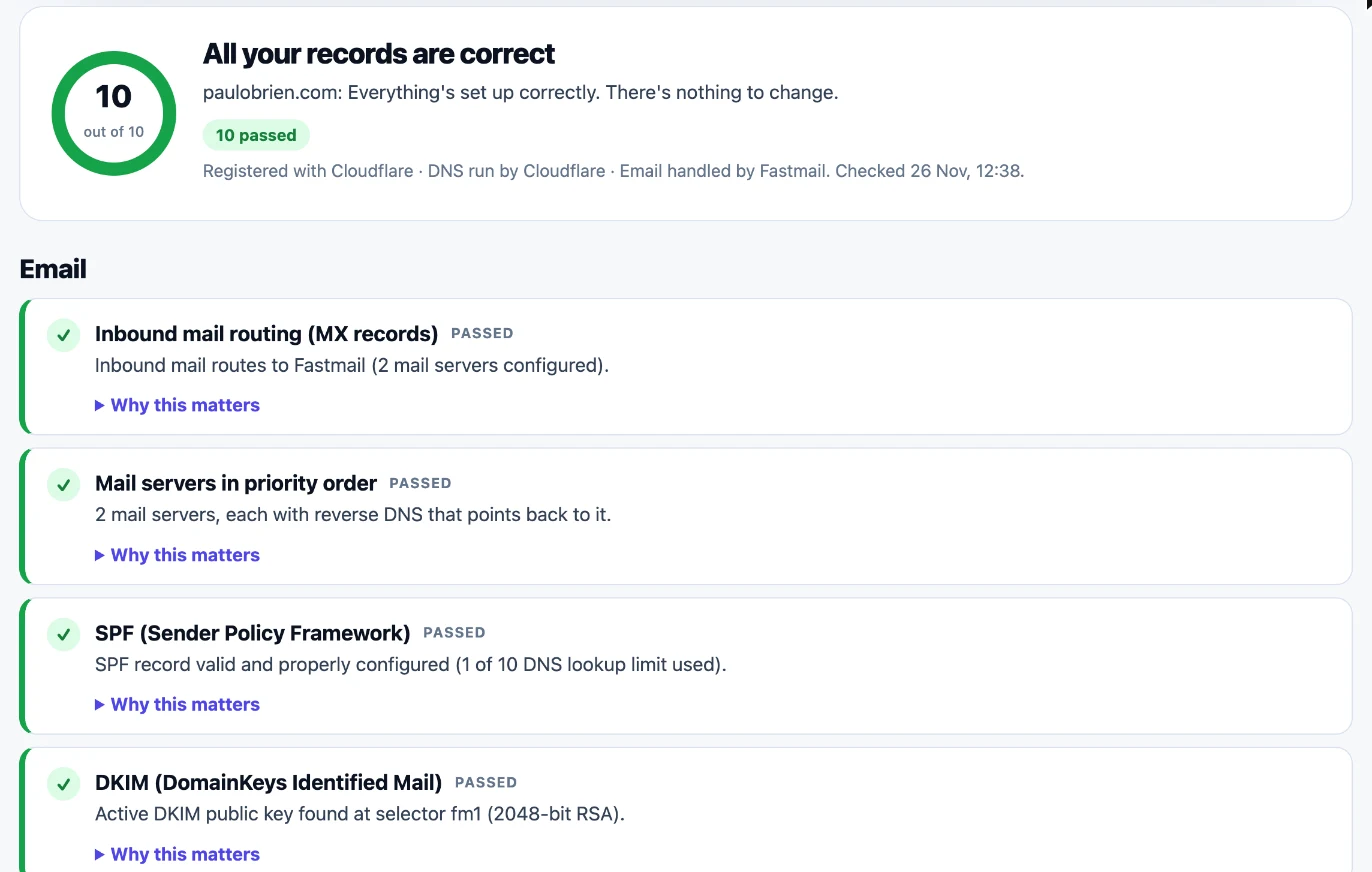
Each finding has a "Why this matters" section if you want the detail, and a Re-check button for when you've made the change. Changes in Cloudflare usually show up within five minutes.
Who it's for
Anyone whose email lands in junk. Run it before you do anything else. If something's wrong, it's usually here.
People setting up a new domain or provider. Moving to Fastmail, Google Workspace or Microsoft 365? Check the records once the move is done, so nothing is half finished.
Anyone who sends newsletters or invoices. Gmail, Yahoo and Microsoft now expect SPF, DKIM and DMARC to be set up properly for bulk senders, and the checker tells you if you're there.
People who look after other people's domains. A quick way to check a client's setup before you touch anything.
Good to know
- It's free for subscribers to paulobrien.dev, up to 20 checks a day. Subscribing also unlocks the other tools.
- It can only see public DNS, so it checks your setup, not individual emails. For that, use the Mail tester.
- It tells you what to change, but it never changes anything itself.
Try it
The DNS checker is on the tools page, along with the Mail tester, which checks a real email rather than the domain. Tomorrow I'll take a proper look at that one.
As always, sharing the love.